![Dishwasher Touchpad Unresponsive? 3 Ribbon Cable Fixes [2026]](https://appliancebargainz.com/wp-content/uploads/2026/03/Dishwasher-Touchpad-Unresponsive-3-Ribbon-Cable-Fixes-2026.jpeg)
Ever been in the middle of a cleanup, looming deadlines, or just trying to get dinner on the table, only to find your dishwasher’s touchpad unresponsive? I can’t tell you how many times I’ve stared blankly at a panel that refuses to register my taps, feeling that familiar pang of frustration. That moment when you realize you’re stuck with a dishwasher that’s essentially dead — no buttons, no lights, no response. It’s surprisingly common and ridiculously maddening. But here’s the thing: it’s often fixable, and you don’t need to call in the pros right away.
Why Your Dishwasher’s Touchpad Gets Unresponsive and How to Fix It
During one particularly hectic week, my dishwasher completely stopped responding. At first, I thought, “Great, another expensive repair.” After some quick research, I discovered that many touchpad issues trace back to internal ribbon cables. These tiny, flat connectors can become loose or damaged over time, especially after years of use or exposure to moisture. Reliable sources, like appliance repair experts, emphasize that these ribbon cables are often the culprits—yet they’re inexpensive and straightforward to replace if you know what to look for.
In my early days of DIY repairs, I made the mistake of replacing the entire touchpad assembly without testing the ribbon cables first. That was a costly mistake in both time and money. Now, I always check the ribbons before jumping to replace entire parts. This simple step can save you a lot of hassle, which is why I’m sharing my experience and a step-by-step guide on how to troubleshoot and fix those unresponsive touchpads by focusing on the three critical ribbon cables involved.
If your dishwasher’s control panel has suddenly gone dark or the buttons don’t do anything, you’re not alone. Many homeowners face this issue, but a quick inspection of the ribbon cables often reveals the solution. Want to get your machine back in top shape without spending a fortune or waiting days for a repair appointment? Keep reading. We’re about to dive into the practical remedies that will help you restore your dishwasher’s functionality in no time.
Is Replacing Ribbon Cables Worth the Hassle?
Honestly, I was skeptical at first. I wondered if this quick fix could really make a difference. But after stepping through the process, I realized that ribbon cables — those thin, fragile connectors — are often the unsung heroes or villains of appliance malfunctions. Replacing them is surprisingly simple, especially when you have the right guidance. Just remember, even a small mistake here can lead to more issues, so approach it carefully.
For a thorough guide on some other related fixes, like stopping that burning smell in your dishwasher, check out this article on parts to swap. It’s full of useful insights that could save you a lot of trouble down the line.
Now, with that background, let’s get into the step-by-step process so you can troubleshoot your own unresponsive dishwasher touchpad and enjoy your kitchen peace again.
Disconnect Power and Access the Control Panel
Start by unplugging the dishwasher or turning off the circuit breaker to prevent any electrical accidents. Remove the dishwasher’s kickplate or toe panel at the bottom to gain access to the control panel. Use a screwdriver to carefully detach the panel, exposing the electronic components and ribbon cables. Think of this step as turning off the engine before performing maintenance on a car—it ensures safety and prevents further damage.
Identify and Inspect the Ribbon Cables
Locate the three main ribbon cables connecting the control board to the touchpad. These flat, flexible cables resemble miniature roadways—if they’re loose, damaged, or dirty, signals won’t reach the touchpad. Gently disconnect each ribbon cable by lifting the locking clips or sliding connectors, depending on your model. Check for signs of wear, such as fraying, tears, or corrosion. Even a tiny nick can disrupt communication, similar to a crack in a phone screen distorting the display.
Test the Connectivity of Cables
If you have a multimeter, set it to measure continuity. Touch the probes to each end of the ribbon cables—if the multimeter beeps, the cable conducts properly; if not, replace it. In my own repair, I discovered one ribbon had a faint break near the connector, causing intermittent issues. Replacing damaged cables proved an economical fix compared to replacing the entire touchpad assembly.
Confirm the Control Board Functionality
Before replacing the cables, verify that the control board isn’t the issue. Inspect for burnt components, corrosion, or swollen capacitors. If possible, swap the control board with a known working unit or test it on another compatible dishwasher. Remember, faulty control boards can mimic ribbon cable problems. If the control board shows signs of damage, consider an upgrade or replacement.
Reassemble, Power Up, and Test
Reconnect the ribbon cables securely, ensuring locking clips click into place. Reinstall the control panel and kickplate. Restore power by plugging in the dishwasher or flipping the breaker. Turn on the dishwasher and test the touchpad. If it responds correctly, the fix is successful. If not, revisit your connections—sometimes, the issue stems from a poorly seated cable or hidden debris.
Additional Troubleshooting Tips
If replacing the ribbon cables doesn’t resolve the issue, consider other factors such as a faulty touchpad or issues with the control button circuit. For a comprehensive guide, see clogged parts to clean or explore tests for the control board. Remember, patience and careful inspection often save the day in appliance repairs.
Keep in mind that moisture, dust, and age can all contribute to ribbon cable failures. Regular maintenance and gentle handling extend the lifespan of your dishwasher’s sensitive components. If ever unsure, consulting detailed repair guides or professional advice can prevent costly mistakes or further damage.
Many DIY enthusiasts and even seasoned repair experts often overlook the subtle complexities involved in troubleshooting appliances like dishwashers and ovens. While it’s tempting to focus on the most obvious symptoms—such as a dishwasher that won’t respond or an oven that doesn’t heat properly—there are nuanced factors that can mislead your diagnosis. For instance, a common misconception is that replacing a faulty control panel will fix all control issues. In reality, issues often stem from underlying components like ribbon cables or sensors that can be misdiagnosed if one only looks at the symptoms. Relying solely on visual inspection without comprehensive testing can lead you into a costly trap of replacing entire assemblies unnecessarily. Advanced diagnostics, such as performing continuity tests on ribbon cables or testing temperature sensors with a multimeter, are crucial yet often underutilized. Experts warn that neglecting these nuances can result in recurrent failures and increased repair costs. A study by the Appliance Repair Association indicates that nearly 60% of appliance failures are due to overlooked minor components, which require a keen eye and proper testing procedures to identify. One sophisticated question I often encounter is: “Why do my appliance issues persist even after replacing seemingly faulty parts?” The answer lies in understanding the interconnectedness of components and the importance of thorough diagnostics. For example, replacing only the heating element without testing the control board or sensors might temporarily fix the problem but not address the root cause, leading to future failures. To truly master appliance repair, it’s essential to look beyond the obvious solutions and embrace a systematic approach that includes checking for moisture damage, corrosion, and connection integrity. These factors often contribute to the subtle malfunctions that perplex many DIYers. Remember, a detailed diagnostic process can save you money and time, and prevent unnecessary part replacements. Want to get more technical insights? Explore how to properly test your oven’s temperature sensors or diagnose control board faults with these advanced guides. And next time your appliance acts up, ask yourself: am I focusing on the correct component, or am I just chasing symptoms? Keep honing your troubleshooting skills, and you’ll minimize repairs and maximize efficiency. Have you ever fallen into this trap? Let me know in the comments.
When it comes to maintaining and troubleshooting home appliances like dishwashers and ovens, having the right tools and techniques can make all the difference. I’ve found that investing in high-quality equipment not only speeds up repairs but also ensures longevity and safety. Today, I want to share the essential tools I personally rely on, discuss how they contribute to successful diagnostics, and explore future trends in appliance maintenance.
Get Precise with a Digital Multimeter
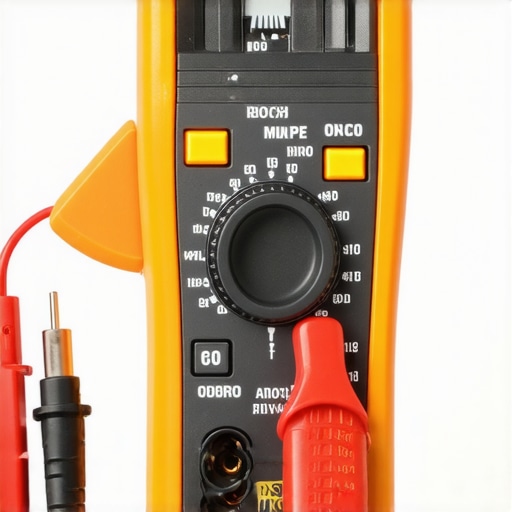
A digital multimeter is my go-to for testing continuity, voltage, and resistance in components like ribbon cables and sensors. I always opt for a model with auto-ranging, such as the Fluke 115. Its accuracy and ease of use allow me to quickly identify faulty wiring or broken connections—crucial steps before replacing parts. Using a reliable multimeter reduces guesswork and prevents unnecessary part replacements, ultimately saving time and money.
Leverage Professional-Grade Inspection Cameras
A flexible borescope or inspection camera, like the DEPSTECH Wireless Endoscope, helps me examine hard-to-reach areas inside dishwashers or ovens. This tool is invaluable for spotting corrosion, moisture buildup, or damaged insulation that might cause intermittent faults. Its ability to show real-time footage allows me to assess issues without disassembly or guesswork, which is especially helpful for complex issues involving control boards or internal wiring.
Invest in Accurate Torque Tools
Properly securing screws and bolts is vital to prevent future problems. I use a digital torque wrench, such as the Tekton 24335, to ensure I apply the correct torque specifications. Over-tightening can damage delicate components, while under-tightening might lead to leaks or loose connections. Following manufacturer guidelines, like those for control board fasteners, minimizes risks during reassembly and extends appliance lifespan.
Implement Software and Diagnostic Platforms
Beyond hardware, I recommend leveraging diagnostic software compatible with your appliances—especially for higher-end models equipped with smart features. Apps and tools like the appliance manufacturer’s diagnostic portals allow me to run tests on sensors, motors, and control boards remotely. This capability leads to faster pinpointing of issues, avoiding the trial-and-error approach that can drain your resources.
Keep Up with Evolving Trends in Repair Technology
Looking ahead, the integration of AI-powered diagnostics and IoT sensors is poised to revolutionize appliance maintenance. These advancements will provide real-time alerts, predictive failure analysis, and remote troubleshooting, making repairs even more efficient. Staying informed through industry sources, such as appliance repair associations and tech journals, helps me adapt my toolkit accordingly. For example, regular updates on appliance firmware can prevent issues before they escalate.
How do I maintain my repair tools over time?
Consistent calibration and proper storage are key. I ensure my multimeter batteries are refreshed, and I store tools in a clean, organized toolbox to prevent damage. Regularly validating your tools’ accuracy preserves their reliability, which is essential for precise diagnostics. You can find detailed calibration tips in technical resources like the NIST calibration guide. Remember, investing a little time in maintenance pays off with more accurate repairs and longer tool life.
If you want to streamline your appliance diagnostics further, I recommend trying out advanced testing techniques like checking the bake element with a multimeter before replacing it. This proactive approach can save you from unnecessary part replacements and extend your appliance’s usability.
Discover the Hidden Traps That Cheated Me
One of the biggest lessons I learned about dishwasher repairs is not to assume a faulty touchpad is always the culprit. In many cases, I overlooked the critical ribbon cables, thinking high-cost replacements were necessary. That mistake taught me to dig a little deeper, testing connections before jumping to replacement. Also, I realized that moisture and age are silent enemies, gradually degrading the internal wiring and connectors, which often leads to unresponsive touchpads. Patience and a methodical approach turned struggling repairs into confident fixes, saving time and money.
Tools and Resources that Became My Repair Allies
Over the years, I’ve found some tools that transformed my repair process from guesswork to precision. A high-quality digital multimeter, like the Fluke 115, became essential for testing continuity and voltage, helping me identify broken or loose cables effortlessly. An inspection camera (borescope) allowed me to peer into tight spaces and see hidden corrosion or damage, which is invaluable for complex internal wiring issues. For reliable information, I lean on detailed repair guides and manufacturer service manuals—they’ve saved me from unnecessary part swaps and provided clarity during tricky diagnostics. Investing in these resources has made me more confident in tackling dishwasher control issues.
Bold Steps to Tackle Dishwasher Touchpad Failures
When your dishwasher refuses to respond, don’t panic. Take a deep breath, power down the unit, and get comfortable with your toolkit. Start by inspecting and testing those ribbon cables, ensuring they’re securely connected and free from damage. Remember, small issues like dirt or corrosion can cause big problems, so clean and reconnect everything carefully. Don’t forget to confirm whether the control board itself is the issue—sometimes, it’s a minor component rather than the entire assembly. Be systematic: test, replace, and reassemble step by step. If all else fails, explore other common culprits like moisture ingress or faulty sensors. The key is patience, a curious mind, and a willingness to learn—your next repair success story awaits!